<!DOCTYPE html>
    <html lang="vi" xmlns="http://www.w3.org/1999/xhtml" prefix="og: http://ogp.me/ns#">
    <head>
<title>Adobe mở Firefly AI Assistant&#x3A; Chỉ cần mô tả, hệ thống tự làm nhiều bước</title>
<meta name="description" content="Adobe mở Firefly AI Assistant&#x3A; Chỉ cần mô tả, hệ thống tự làm nhiều bước - Savefile - Tin Tức -...">
<meta name="author" content="docbao.info - đọc báo, xem tin tức cập nhật 24h">
<meta name="copyright" content="docbao.info - đọc báo, xem tin tức cập nhật 24h [ad@docbao.info]">
<meta name="google-adsense-account" content="ca-pub-3441340125113052">
<meta name="generator" content="NukeViet v5.0">
<meta name="viewport" content="width=device-width, initial-scale=1">
<meta http-equiv="Content-Type" content="text/html; charset=utf-8">
<meta property="og:title" content="Adobe mở Firefly AI Assistant: Chỉ cần mô tả, hệ thống tự làm nhiều bước">
<meta property="og:type" content="website">
<meta property="og:description" content="Savefile - Tin Tức - https&#x3A;&#x002F;&#x002F;docbao.info&#x002F;savefile&#x002F;ai&#x002F;adobe-mo-firefly-ai-assistant-chi-can-mo-ta-he-thong-tu-lam-nhieu-buoc-2822.html">
<meta property="og:site_name" content="docbao.info - đọc báo, xem tin tức cập nhật 24h">
<meta property="og:image" content="https://docbao.info/uploads/og-docbao-info.jpg">
<meta property="og:image:url" content="https://docbao.info/uploads/og-docbao-info.jpg">
<meta property="og:image:type" content="image/jpeg">
<meta property="og:image:width" content="635">
<meta property="og:image:height" content="350">
<meta property="og:image:alt" content="docbao.info - đọc báo, xem tin tức cập nhật 24h">
<meta property="og:url" content="https://docbao.info/savefile/ai/adobe-mo-firefly-ai-assistant-chi-can-mo-ta-he-thong-tu-lam-nhieu-buoc-2822.html">
<link rel="shortcut icon" href="https://docbao.info/uploads/favicon.ico">
<link rel="canonical" href="https://docbao.info/savefile/ai/adobe-mo-firefly-ai-assistant-chi-can-mo-ta-he-thong-tu-lam-nhieu-buoc-2822.html">
<link rel="alternate" href="https://docbao.info/rss/" title="Tin Tức" type="application/rss+xml">
<link rel="alternate" href="https://docbao.info/rss/cong-nghe/" title="Tin Tức - Công nghệ" type="application/rss+xml">
<link rel="alternate" href="https://docbao.info/rss/ai/" title="Tin Tức - AI" type="application/rss+xml">
<link rel="alternate" href="https://docbao.info/rss/kham-pha/" title="Tin Tức - Khám phá" type="application/rss+xml">
<link rel="alternate" href="https://docbao.info/rss/lich-su/" title="Tin Tức - Lịch sử" type="application/rss+xml">
<link rel="alternate" href="https://docbao.info/rss/tri-thuc/" title="Tin Tức - Tri thức" type="application/rss+xml">
<link rel="alternate" href="https://docbao.info/rss/suc-khoe/" title="Tin Tức - Sức khỏe" type="application/rss+xml">
<link rel="alternate" href="https://docbao.info/rss/the-thao/" title="Tin Tức - Thể thao" type="application/rss+xml">
<link rel="alternate" href="https://docbao.info/rss/du-lich/" title="Tin Tức - Du lịch" type="application/rss+xml">
<link rel="alternate" href="https://docbao.info/rss/giai-tri/" title="Tin Tức - Giải trí" type="application/rss+xml">
<link rel="alternate" href="https://docbao.info/rss/kinh-doanh/" title="Tin Tức - Kinh doanh" type="application/rss+xml">
<link rel="preload" as="font" href="/assets/fonts/fontawesome-webfont.woff2" type="font/woff2" crossorigin>
<link rel="preload" as="font" href="/themes/default/fonts/NukeVietIcons.woff2" type="font/woff2" crossorigin>
<link rel="preload" as="image" href="/themes/docbao/images/header.png" type="image/png">
<link rel="preload" as="script" href="https://docbao.info/assets/js/jquery/jquery.min.js" type="text/javascript">
<link rel="preload" as="script" href="https://docbao.info/assets/js/language/vi.js" type="text/javascript">
<link rel="preload" as="script" href="https://docbao.info/assets/js/DOMPurify/purify3.js" type="text/javascript">
<link rel="preload" as="script" href="https://docbao.info/assets/js/global.js" type="text/javascript">
<link rel="preload" as="script" href="https://docbao.info/assets/js/site.js" type="text/javascript">
<link rel="preload" as="script" href="https://docbao.info/themes/docbao/js/news.js" type="text/javascript">
<link rel="preload" as="script" href="https://docbao.info/themes/docbao/js/main.js" type="text/javascript">
<link rel="preload" as="script" href="https://docbao.info/themes/docbao/js/custom.js" type="text/javascript">
<link rel="preload" as="script" href="https://www.googletagmanager.com/gtag/js?id=G-R6970XRXPT" type="text/javascript">
<link rel="preload" as="script" href="https://docbao.info/themes/docbao/js/bootstrap.min.js" type="text/javascript">
<link rel="preload" as="style" href="/assets/css/core.r.min.css" type="text/css">
<link rel="preload" as="style" href="https://docbao.info/assets/css/font-awesome.min.css" type="text/css">
<link rel="preload" as="style" href="https://docbao.info/themes/docbao/css/bootstrap.min.css" type="text/css">
<link rel="preload" as="style" href="https://docbao.info/themes/docbao/css/style.css" type="text/css">
<link rel="preload" as="style" href="https://docbao.info/themes/docbao/css/style.responsive.css" type="text/css">
<link rel="preload" as="style" href="https://docbao.info/themes/docbao/css/news.css" type="text/css">
<link rel="preload" as="style" href="https://docbao.info/themes/docbao/css/custom.css" type="text/css">
<link rel="stylesheet" href="/assets/css/core.r.min.css">
<link rel="stylesheet" href="https://docbao.info/assets/css/font-awesome.min.css">
<link rel="stylesheet" href="https://docbao.info/themes/docbao/css/bootstrap.min.css">
<link rel="stylesheet" href="https://docbao.info/themes/docbao/css/style.css">
<link rel="stylesheet" href="https://docbao.info/themes/docbao/css/style.responsive.css">
<link rel="StyleSheet" href="https://docbao.info/themes/docbao/css/news.css">
<link rel="stylesheet" href="https://docbao.info/themes/docbao/css/custom.css">
<style type="text/css">
    body{background: #fff;}
</style>
</head>
    <body>
<div class="container-fluid"style="background-color:#fff;">
<div id="print">
    <div id="hd_print">
        <h2 class="pull-left">docbao.info - đọc báo, xem tin tức cập nhật 24h</h2>
        <p class="pull-right"><a title="docbao.info - đọc báo, xem tin tức cập nhật 24h" href="https://docbao.info/">https://docbao.info</a></p>
    </div>
    <div class="clear"></div>
    <hr />
    <div id="content">
        <h1>Adobe mở Firefly AI Assistant: Chỉ cần mô tả, hệ thống tự làm nhiều bước</h1>
        <ul class="list-inline">
            <li>Chủ nhật, 03 Tháng Năm 2026 5:00 SA</li>
            <li class="hidden-print txtrequired"><em class="fa fa-print">&nbsp;</em><a title="In ra" href="https://docbao.info/#" data-toggle="winCMD" data-cmd="print">In ra</a></li>
            <li class="hidden-print txtrequired"><em class="fa fa-power-off">&nbsp;</em><a title="Đóng cửa sổ này" href="https://docbao.info/#"  data-toggle="winCMD" data-cmd="close">Đóng cửa sổ này</a></li>
        </ul>
        <div class="clear"></div>
        <div id="hometext">
            Bản thử nghiệm công khai đang phát hành toàn cầu cho người dùng Creative Cloud Pro và các gói Firefly trả phí.
        </div>
        <div id="bodytext" class="clearfix">
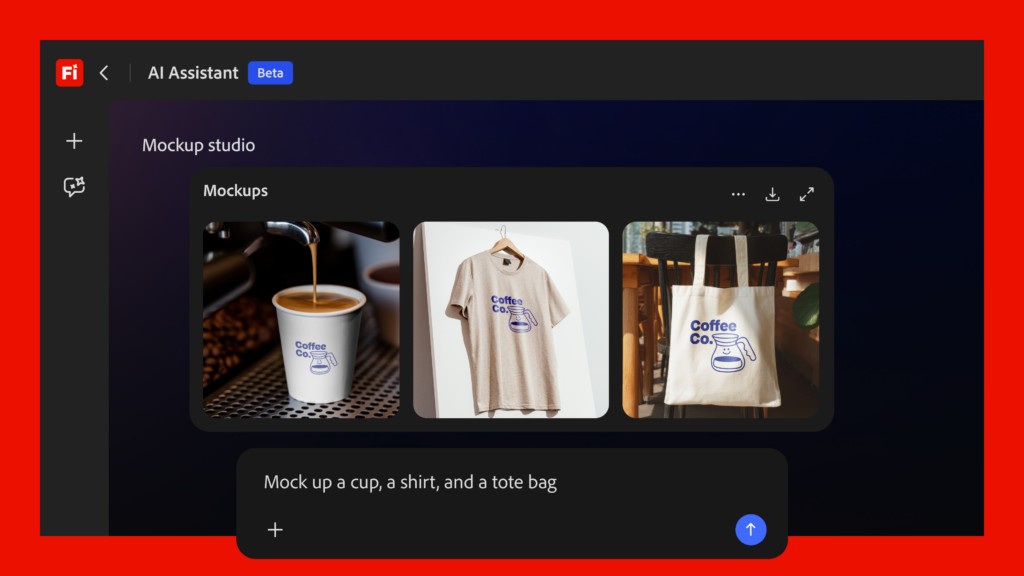
            <div data-check-position="body_start"> </div> <p>  Adobe đã mở bản thử nghiệm công khai của Firefly AI Assistant ngay trong Adobe Firefly, bổ sung một trợ lý sáng tạo hoạt động theo dạng hội thoại cho bộ công cụ AI của hãng. Tính năng này đang được phát hành trên phạm vi toàn cầu và dành cho người dùng Creative Cloud Pro cùng các gói Firefly trả phí gồm Pro, Pro Plus và Premium. </p> <p>  Điểm chính của Firefly AI Assistant là cho phép người dùng mô tả kết quả mong muốn bằng ngôn ngữ tự nhiên, sau đó hệ thống tự sắp xếp nhiều bước xử lý cần thiết trên các ứng dụng của Adobe. Theo giới thiệu của hãng, trợ lý này có thể phối hợp công cụ giữa Firefly, Photoshop, Lightroom, Premiere Pro, Illustrator và các ứng dụng khác trong hệ sinh thái Creative Cloud để hoàn thành công việc từ đầu đến cuối. </p> <p>  Adobe cho biết công nghệ đứng sau tính năng mới là Creative Agent. Nền tảng này được thiết kế để xử lý những tác vụ sáng tạo thường cần nhiều bước thủ công, chẳng hạn biến ảnh chụp sản phẩm thành bộ nội dung cho mạng xã hội, tạo bảng gợi ý ý tưởng từ bản mô tả yêu cầu, chỉnh lại ảnh chân dung, dựng hình minh họa sản phẩm, tạo nhiều phiên bản nội dung cho mạng xã hội hoặc chỉnh sửa hàng loạt. </p> <figure class="VCSortableInPreviewMode noCaption" type="Photo" style="">  <div>   <img alt="Adobe mở Firefly AI Assistant: Chỉ cần mô tả, hệ thống tự làm nhiều bước - Ảnh 1." data-original="/uploads/news/2026_05/e33c5cff63124d02890f85f08e219fe5-1777418598768545-1777790295483-17777902962121321839701.jpg" loading="lazy" rel="lightbox" src="https://docbao.info/uploads/news/2026_05/e33c5cff63124d02890f85f08e219fe5-1777418598768545-1777790295483-17777902962121321839701.jpg" title="" type="photo" class="" w="1024" h="371" width="1024" height="371">  </div>  <figcaption class="PhotoCMS_Caption"><p data-placeholder="Nhập chú thích ảnh" class="NLPlaceholderShow"></figcaption> </figure> <p>  Firefly AI Assistant hiện cho phép truy cập hơn 60 công cụ chuyên nghiệp. Trong đó có các tính năng quen thuộc như Generative Fill, tự động cân chỉnh tông ảnh, xóa nền, chuyển hình sang dạng vector và áp dụng các thiết lập mẫu có sẵn. Adobe nói trợ lý này hỗ trợ cả khâu tạo mới lẫn chỉnh sửa đối với ảnh, video và các tệp thiết kế. </p> <p>  Một thay đổi quan trọng trong đợt cập nhật là khả năng theo dõi quy trình làm việc. Người dùng có thể nhìn thấy từng bước mà hệ thống đang thực hiện, chỉnh lại kết quả, đổi hướng yêu cầu hoặc chuyển sang tự thao tác bất kỳ lúc nào. Khi hoàn tất, tệp có thể được lưu trực tiếp lên kho lưu trữ Creative Cloud để tiếp tục sử dụng trên các ứng dụng Adobe khác. </p> <figure class="VCSortableInPreviewMode noCaption" type="Photo" style="">  <div>   <img alt="Adobe mở Firefly AI Assistant: Chỉ cần mô tả, hệ thống tự làm nhiều bước - Ảnh 2." data-original="/uploads/news/2026_05/bbb449e28b644339adc3c6f3c22c935c-1777418599824430-1777790296752-1777790296930127288731.jpg" loading="lazy" rel="lightbox" src="https://docbao.info/uploads/news/2026_05/bbb449e28b644339adc3c6f3c22c935c-1777418599824430-1777790296752-1777790296930127288731.jpg" title="" type="photo" class="" w="1024" h="576" width="1024" height="576">  </div>  <figcaption class="PhotoCMS_Caption"><p data-placeholder="Nhập chú thích ảnh" class="NLPlaceholderShow"></figcaption> </figure> <p>  Adobe cũng đưa ra một số tình huống sử dụng cụ thể. Người làm nội dung mạng xã hội có thể tải lên một ảnh duy nhất rồi yêu cầu tạo các phiên bản phù hợp cho Instagram, TikTok, Snapchat và Facebook. Hệ thống sẽ tự điều chỉnh khung cắt và bố cục cho từng nền tảng nhưng vẫn giữ phần hình ảnh chính. Với nhà thiết kế, người dùng có thể tải logo và ảnh bao bì sản phẩm, sau đó yêu cầu trợ lý đặt thiết kế lên sản phẩm bằng cách tự cân chỉnh kích thước, ánh sáng, vị trí và góc nhìn. Nếu cần, người dùng tiếp tục nhập thêm yêu cầu để tinh chỉnh kết quả cuối cùng. </p> <p>  Ngoài Adobe Firefly, Adobe cho biết hãng cũng đang phát triển khả năng đưa công nghệ tác nhân sáng tạo của mình sang các nền tảng AI bên thứ ba, trong đó có Claude của Anthropic. Mục tiêu là để người dùng có thể sử dụng công cụ Adobe ngay trong những môi trường AI bên ngoài. Trong thời gian bản thử nghiệm công khai diễn ra, những tài khoản đủ điều kiện sẽ được cấp lượng tín dụng tạo sinh làm mới hằng ngày để dùng với Firefly AI Assistant. </p> <div class="clearfix" data-check-position="body_end"> </div><!--Sun May 03 2026 15:31:00 GMT+0700 (Indochina Time) -- Sun May 03 2026 15:31:00 GMT+0700 (Indochina Time) -- Sun May 03 2026 13:38:29 GMT+0700 (Indochina Time)-->

        </div>
                <div id="author">
                        <p>
                <strong>Nguồn tin:</strong>
                genk.vn
            </p>
        </div>
    </div>
    <div id="footer" class="clearfix">
        <div id="url">
            <strong>URL của bản tin này: </strong><a href="https://docbao.info/savefile/ai/adobe-mo-firefly-ai-assistant-chi-can-mo-ta-he-thong-tu-lam-nhieu-buoc-2822.html" title="Adobe mở Firefly AI Assistant: Chỉ cần mô tả, hệ thống tự làm nhiều bước">https://docbao.info/savefile/ai/adobe-mo-firefly-ai-assistant-chi-can-mo-ta-he-thong-tu-lam-nhieu-buoc-2822.html</a>
        </div>
        <div class="clear"></div>
        <div class="copyright">
            &copy; docbao.info - đọc báo, xem tin tức cập nhật 24h
        </div>
        <div id="contact">
            <a href="mailto:ad@docbao.info">ad@docbao.info</a>
        </div>
    </div>
</div>
</div>
        <div id="timeoutsess" class="chromeframe">
            Bạn đã không sử dụng site, <a data-toggle="timeoutsesscancel" href="https://docbao.info/#">Bấm vào đây để duy trì trạng thái đăng nhập</a>. Thời gian chờ: <span id="secField"> 60 </span> giây
        </div>
        <div id="openidResult" class="nv-alert" style="display:none"></div>
        <div id="openidBt" data-result="" data-redirect=""></div>
<script src="https://docbao.info/assets/js/jquery/jquery.min.js"></script>
<script>var nv_base_siteurl="/",nv_assets_dir="assets",nv_lang_data="vi",nv_lang_interface="vi",nv_name_variable="nv",nv_fc_variable="op",nv_lang_variable="language",nv_module_name="news",nv_func_name="savefile",nv_is_user=0, nv_my_ofs=-4,nv_my_abbr="EDT",nv_cookie_prefix="nv4",nv_check_pass_mstime=1738000,nv_area_admin=0,nv_safemode=0,theme_responsive=1,nv_recaptcha_ver=2,nv_recaptcha_sitekey="",nv_recaptcha_type="image",nv_turnstile_sitekey="",XSSsanitize=1,nv_jsdate_get="dd-mm-yyyy",nv_jsdate_post="dd/mm/yyyy",nv_gfx_width="150",nv_gfx_height="40",nv_gfx_num="6";</script>
<script src="https://docbao.info/assets/js/language/vi.js"></script>
<script src="https://docbao.info/assets/js/DOMPurify/purify3.js"></script>
<script src="https://docbao.info/assets/js/global.js"></script>
<script src="https://docbao.info/assets/js/site.js"></script>
<script src="https://docbao.info/themes/docbao/js/news.js"></script>
<script src="https://docbao.info/themes/docbao/js/main.js"></script>
<script src="https://docbao.info/themes/docbao/js/custom.js"></script>
<script async src="https://www.googletagmanager.com/gtag/js?id=G-R6970XRXPT"></script>
<script>window.dataLayer=window.dataLayer||[];function gtag(){dataLayer.push(arguments)}gtag('js',new Date);gtag('config','G-R6970XRXPT');</script>
<script src="https://docbao.info/themes/docbao/js/bootstrap.min.js"></script>
</body>
</html>